Audiobook dock and shared sidebar refinement
Status: Approved for implementation on October 2, 2026. The product owner has requested implementation. Work follows the visual gates below; package status and actual evidence are recorded in the implementation report.
Sol owns architecture, scope, integration and visual acceptance. Luna workers implement the assigned components and tests after implementation is approved. This plan refines the current player implementation; it does not rewrite the October 1 implementation history. The earlier 15-state browser review is useful regression evidence, not acceptance of this new visual direction.
Plain-English product walkthrough
1. A quieter, darker player frame
The dock, player menus and adjacent drawers become substantially darker. Artwork remains real and readable, but its blurred background cannot wash the controls into bright blue. The actual cover and video picture remain undimmed. Following the owner's latest review, all player tools share smaller, lighter outline icons without circular backgrounds, while keeping comfortable clickable areas. This applies to audio, video, full, phone and popup players. Transport Play/pause and skip controls retain their distinct treatment. The compact white dock play button has visible space above and below it. Linked titles and contributors look like normal text until hover or keyboard focus adds an underline (WP1, WP2, WP4, WP7).
2. Audiobook tools are available directly
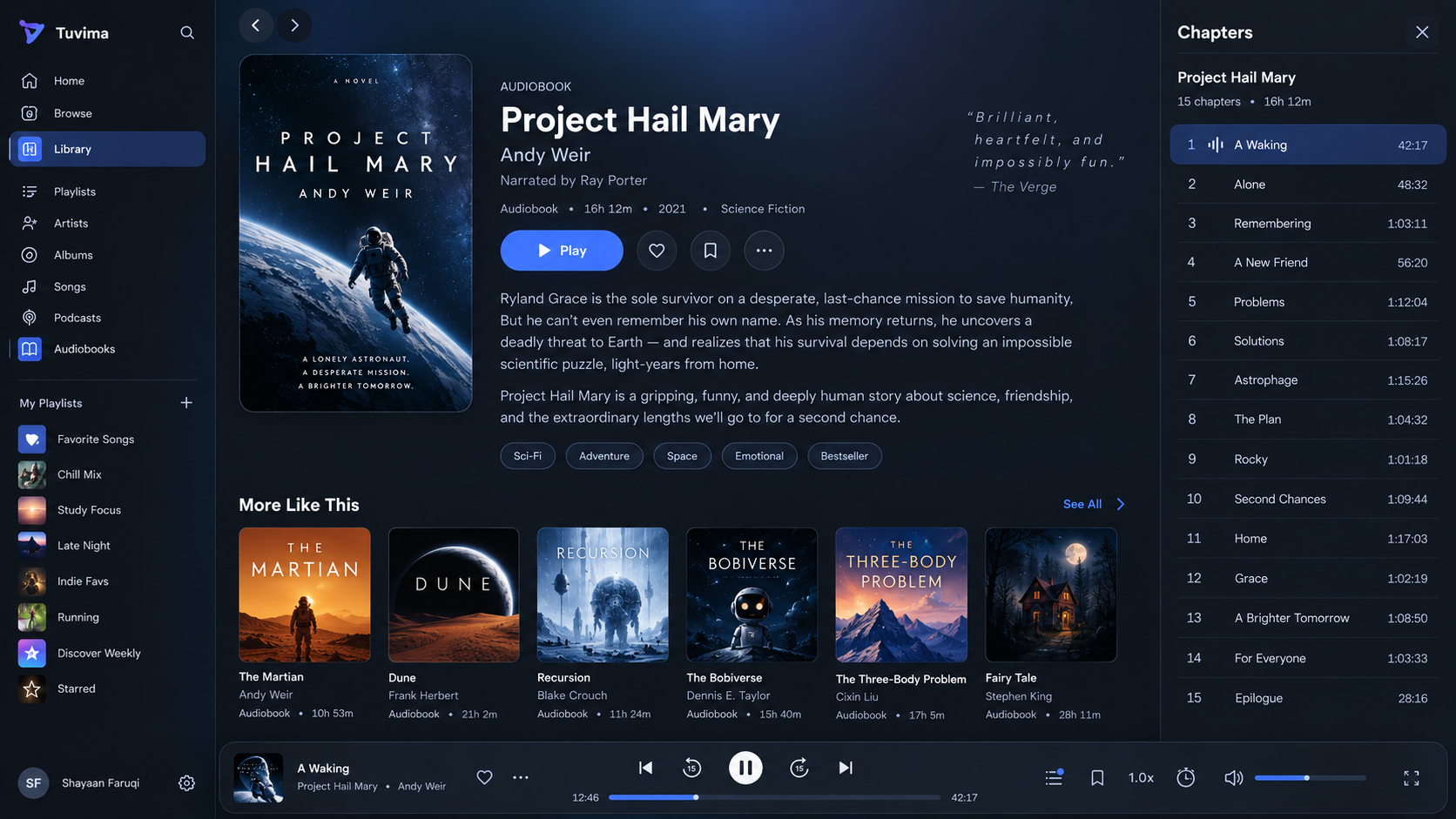
Chapters, Bookmarks, Speed, Sleep, History, Mute, a visible Volume control and Now Playing are directly available in the desktop audiobook dock. They are not hidden in a new More menu. The complete tool group is right-aligned, with separate-window and Close actions at its far-right end rather than beside the title or near the central transport. The seek bar grows with available screen width instead of staying in a fixed narrow lane. An active sleep timer shows its real remaining state visibly and in the control's accessible name. Now Playing is easy to recognize and reach. On a narrower desktop or tablet, the tools deliberately use a second row instead of disappearing, clipping or pushing transport away from the dock's center (WP2, WP4, WP7).
The phone retains its existing player composition. The popup retains its artwork and identity layout, but follows the owner's latest review: its direct tools use the same compact icon treatment as the regular player, without visible Sleep/History labels, and its oversized Play button becomes restrained. Redundant inner window framing is removed and the player and adjacent content have equal-height outer bounds. Utilities use slightly larger 22px thin outlines, vertically centered in their targets, with no underscore beneath them. Accessible names and tooltips still explain each action. Shared colors, speed/sleep choices, bookmarks and direct Now Playing access carry through (WP2, WP4–WP7).
3. One selected sidebar, with one useful heading
Selecting Chapters opens Chapters; selecting History replaces it with History. Music uses the same rule for Queue, Lyrics and History. Bookmarks opens the quick Add/Saved dialog described below, not another sidebar or an immediate save. There is no stacked workspace, panel resizing between sections, collapse/reorder controls or extra “Audiobook context” heading. The sidebar header names the selected content and offers Close. A book identity/count summary may appear once within Chapters, below that header.
Playback and Ingestion use one shared sidebar slot. Opening an Ingestion item replaces the visible playback sidebar; reopening Chapters replaces that item sidebar. The page and playback session continue normally. Ingestion retains its actual item selection, navigation, authorization and close behavior.
4. The page and sidebar scroll independently
There is one primary page scroll area and one independently scrolling open sidebar. Scrolling the chapter list does not move the library page, and scrolling the page does not cut off a drawer background or hide its final row behind playback. Navigation rails do not add another vertical scrollbar. A rail stays anchored when its contents fit; on a short viewport its remaining links stay reachable through the primary page scroll.
Chapter rows are compact. Chapter number, activity mark, title and duration have stable columns. The playing mark sits inline rather than hanging off a thumbnail or shifting the title. The active chapter remains highlighted; ordinary hover adds an underline to its title without painting a new row background.
5. Speed is a simple list of real choices
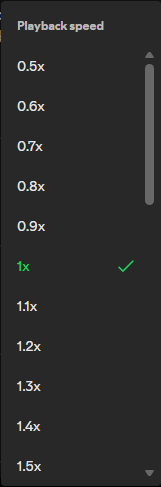
Speed opens a small dark dropdown with one scrollbar and a visible check beside the current rate. Its trigger has no underline and is named for keyboard and assistive-technology users. It replaces the large slider, presets, stepper and reset sections. Choices cover the supported 0.5x–3.0x range, including exact existing fractional choices such as 0.75x, 1.25x and 1.75x. Opening or scrolling the list never changes playback speed. The same choice and exact value appear on desktop, phone, popup and video.
6. Sleep uses a small menu with predictable stopping points
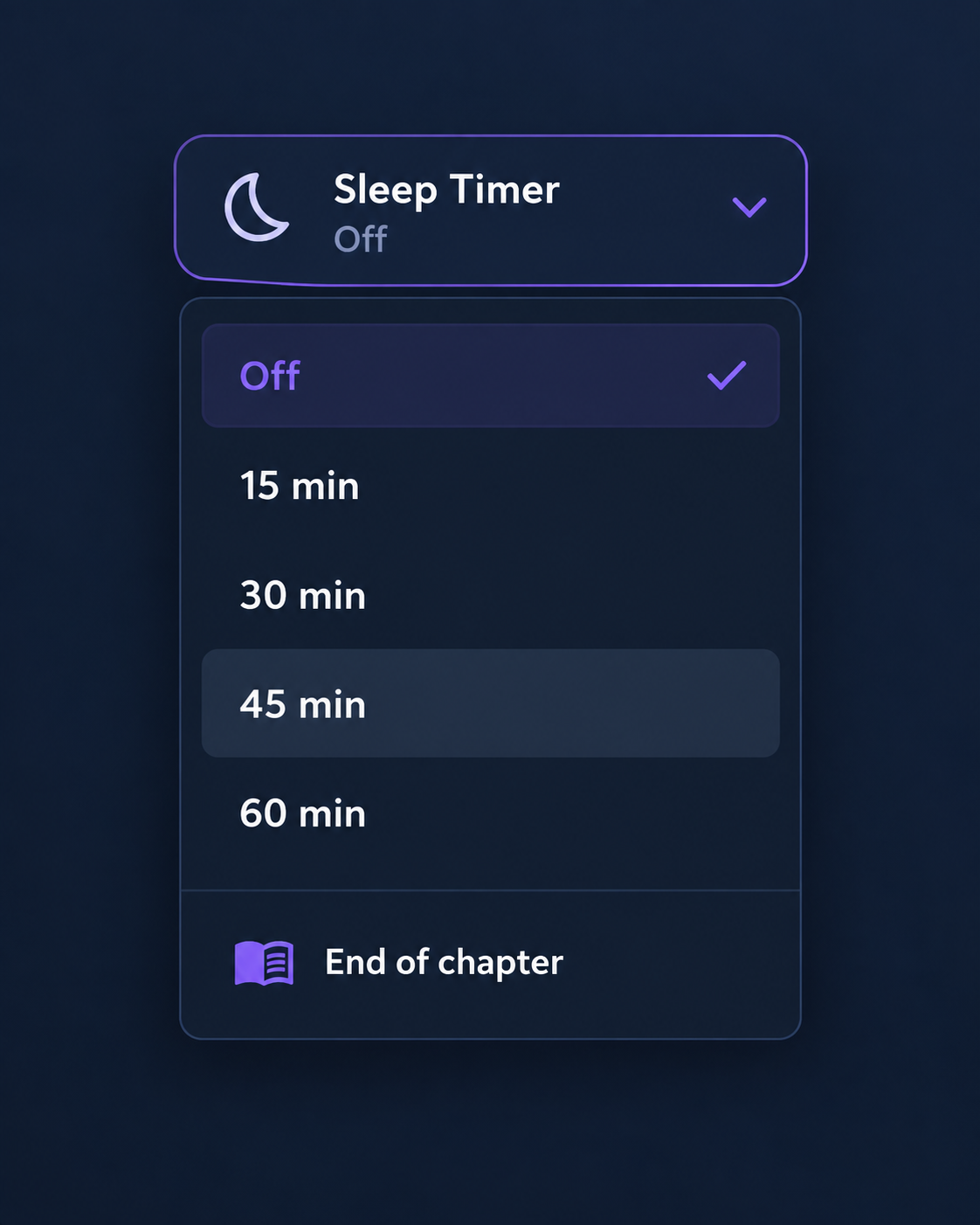
The sleep icon opens a dark flat list: Off, 15, 30, 45 and 60 minutes, End of chapter, and End of next chapter. The trigger does not display the words “Sleep Timer”; its accessible name still explains the action and actual state. The selected check follows the armed choice, not whichever preset is nearest the remaining countdown.
Minute timers keep counting while playback is paused. Chapter timers capture a real stopping chapter when chosen. End of next chapter stops at the end of the immediate actual successor, including a separate owned audiobook file when its boundary is verified. Seeking or skipping does not silently change the target. If the necessary chapter/end is unknown, the choice explains why it is unavailable rather than guessing the end of the book.
7. Bookmarks have a quick Add/Saved dialog
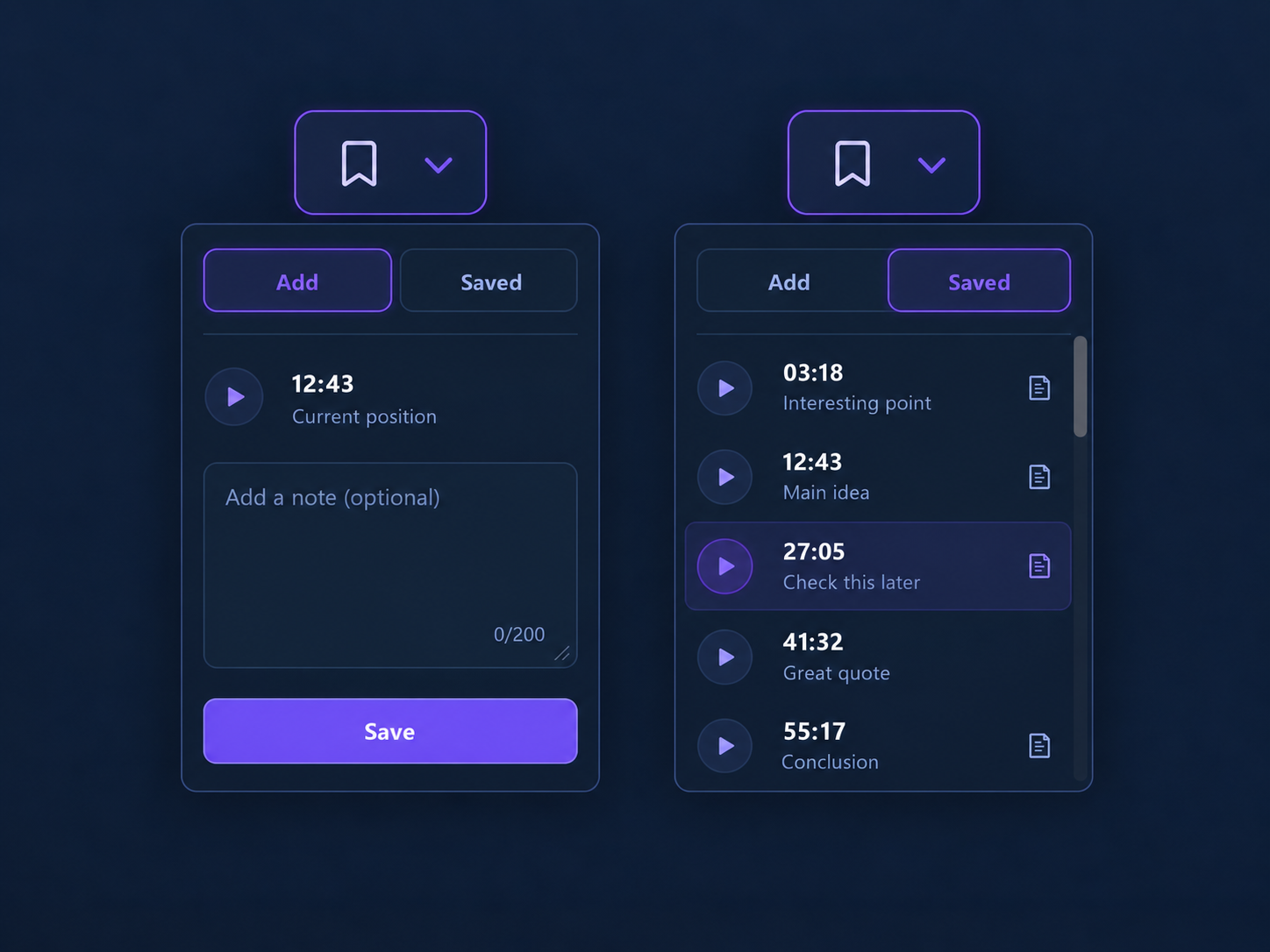
The bookmark icon opens a compact dark dialog with Add and Saved tabs beside the button that opened it on desktop, including the popup's own button. A bounded bottom sheet remains suitable for phone use. Placement follows the local opener and stays within the screen; it does not create another bookmark list or recapture the position. Add captures the current listening position once when the dialog opens. Playback can continue while the listener writes an optional note; Save keeps that captured position, rather than the later position reached while typing. Blank notes are allowed. The note limit is explicitly 200 characters, with matching UI and server validation.
Saved shows real bookmarks with a replay target and a note indicator only when a note exists. The indicator opens the full note for reading; editing saved notes is outside this request. On desktop, a small × requests deletion, then inline confirm/cancel controls protect against accidental removal. On mobile, a horizontal swipe reveals Delete, which requires the same confirmation. Vertical scrolling and a visible/keyboard-accessible deletion alternative remain available. This is one shared dialog and Saved list, not another permanent panel beside Chapters.
What stays the same and what is outside this pass
The single audio host, active queue, saved progress, source-authored chapter titles, real artwork/counts, catalog links and current account/profile/View authorization remain the foundation. Bookmarks/history stay real profile state. The reference's 15 chapters, chapter names and artwork are examples, not replacement content. Actual library data must remain visible. Adding a real Note storage field requires a deliberate fresh-schema development cutover under the pre-beta rule; old-schema disposable bookmark state may be discarded during that explicit validation, not silently migrated or claimed to survive. No state reset happens during planning.
Direct Now Playing access prepares a clear destination for a later audiobook/ebook connection. This pass adds no book synchronization, ebook lookup, linked-reading controls or sync backend. Reading layouts, media delivery, ingestion processing, provider choices and general settings forms are outside the redesign. Existing popup/native-window evidence limits remain explicit.
Representative journeys:
- Start an audiobook, open Chapters, replay another real chapter, then choose History. One sidebar changes content, while the centered dock and audio remain available. Bookmarks opens its separate quick dialog without stacking another sidebar.
- Open Speed, choose 1.25x, close it, and reopen it on a phone. The list checks 1.25x and playback retains the exact rate.
- Scroll a long chapter list to its final entry, then scroll the detail page. Each area moves independently; the drawer background reaches its bottom and the dock stays visible.
- Open an Ingestion item during listening, inspect its actual details, then return to Chapters. Only one sidebar is visible; playback and access checks remain intact.
- Select Now Playing or follow the actual author link without stopping the session. Resize the settled player; its source, position and rate remain unchanged.
- Choose End of next chapter, continue into the verified successor, and hear playback pause once at its captured end. A backward seek does not move that target; switching books cancels it.
- Open Add at 12:43, type a note while audio advances, and save at the captured 12:43. Replay it from Saved, read its note, then cancel or confirm deletion through desktop and mobile controls.
Observable acceptance: compare the new references beside actual renders; inspect all named dock tools without opening More; measure play-button inset and mathematical transport center; switch panels and see exactly one heading/body; scroll both areas to their ends; choose exact fractional speeds and real sleep choices with mouse, keyboard and touch; save the captured bookmark position/note; reveal and confirm deletion without disrupting vertical scrolling; confirm real media/data and unchanged playback through navigation and resize.
| Walkthrough change | Work packages |
|---|---|
| 1. Darker shared frame and unified thin utility icons | WP0, WP1, WP2, WP4, WP7 |
| 2. Direct tools, far-right window actions, responsive seek and compact popup | WP2, WP4, WP5, WP6, WP7 |
| 3. One selected sidebar | WP3, WP6, WP7 |
| 4. Independent page/sidebar scrolling and compact chapters | WP1, WP3, WP7 |
| 5. Simple, exact speed list | WP4, WP7 |
| 6. Flat sleep choices and captured chapter boundary | WP5, WP7 |
| 7. Captured Add/Saved bookmarks and confirmed deletion | WP6, WP7 |
References and review basis
The newest references govern this refinement:
- Audiobook dock and Chapters: 1672×941. Reference dock approximately x251/y852, 1410×83px; sidebar x1332, approximately 340px wide. Play circle approximately 38–40px with about 10px top inset. Ordinary chapter centers are approximately 45px apart.
- Thin dark dock: 2549×86. Used for dark chrome, density and restrained controls; not a request to copy its product navigation or remove audiobook actions.
- Simple speed dropdown: 161×487. Flat rows, visible scroll, one selected check and a compact heading.
- Sleep choices: flat options and selected check. The user additionally requests End of next chapter and removal of visible “Sleep Timer” wording from the icon trigger.
- Bookmark Add/Saved: quick tabs, captured position, optional note, Save, compact real Saved list and note indicators. Deletion confirmation/swipe is an additional explicit user requirement.

These are reference-derived measurements and proposed targets, not claims about an unmeasured new implementation. Desktop, tablet and phone renders must establish the resulting behavior.
Current component audit
Read-only source inspection found the following causes and shared effects:
| Component/source | Current behavior | Required change and affected consumers |
|---|---|---|
ListenNowPlayingBar.razor and CSS |
Audiobook dock filters its primary list to Speed/Chapters, adds More, and hides that strip below 1380px. Audiobook volume is inside More. Dock identity links have a resting cyan underline. | Replace audiobook dock composition and its breakpoint rules. Keep music composition bounded to shared palette/link/base-control effects. |
ListenTransportControls / PlaybackPrimaryButton |
Dock play is 44px with a permanent halo; full phone/popup/video use separate larger recipes. | Separate the compact visual circle from its functional target. Dock uses a 38px visual; the latest popup review also requires a restrained 44–48px visual and consistent compact tools. Retain the full phone and cinematic video recipes. |
PlaybackIconButton / PlaybackControlStrip |
Earlier utility recipes painted circular surfaces and selected rings/glows across hosts. | The owner's latest direction replaces utility circles with one bare thin glyph recipe across all players. Full-player transport remains independently sized. |
PlaybackContextRow / PlaybackActivityMark |
Generic rows are at least 60px, use a 40px leading slot and reserved 44px trailing action slot. Artwork activity is an absolute badge at bottom −3/right −5. | Add a chapter-specific inline grid; preserve thumbnail/actions layouts for Queue, History, Bookmarks and Next Up. |
ListenContextWorkspace, state and preferences |
Multiple Panels, ratios and collapsed state; Add/Move/Collapse/Split/Reset and multiple panel body scrollers. Default music/book layouts each seed two panels. |
Replace the workspace with a canonical single selected context. Remove stack rendering, state, commands and split behavior. |
PlaybackDtos.cs / API UserPlaybackSettingsService |
Serialized workspace DTO contains Visible, Panels, Ratio, Collapsed; API normalizes up to three panels. |
Deliberate current contract cutover to single sidebar preferences; update actual serializers, validation and intentional contract fixtures together. |
MainLayout, MediaSectionShell, ContextSidebarShell |
Outer page is overflow-y:auto; lane content and rail also scroll. Lane height subtracts viewport/appbar/gutters independently of dock allocation. Mobile aside can scroll around another scrolling body. |
One measured height allocation and explicit primary/aside scroll ownership. No competing viewport calculations or nested vertical scrollers. |
IngestionTasksTab |
Own nested ContextSidebarShell inside the page already wrapped by the layout's playback sidebar. |
Register item content with the shared sidebar host; retain item URL, actual data and authorized operations. |
| Playback tokens and artwork atmosphere | Current bg/surface/elevated are #0B1727/#102034/#15273B. Expanded blurred art has opacity .5 and a weak dark overlay. |
Darken chrome and constrain background artwork brightness, while leaving foreground art/video intact. |
PlaybackSpeedControl / AppSelect |
Speed is a slider plus six presets, stepper and reset. AppSelect is string-valued, centrally styled; it is not AppSelect<double>. |
Use the central select layer with a numeric adapter and compact list variant. No local raw select or standalone dropdown theme. |
| Rate setters | Controller rounds to tenths before clamping .5–3; bar/video allow .5–3; popup/live chooser cap at 2.5 despite settings supporting 3 and quarter rates. | One finite, exact supported rate contract; remove unintended rounding and inconsistent UI caps. |
PlaybackSleepTimerControl, controller and popup/bar wrappers |
Current shared sleep UI has status/slider/presets/stepper. End of chapter stores only a mode and resolves the current chapter on every tick, with a first-chapter fallback. Timers can survive a switch between different audiobooks. | Replace with one flat chooser and one authoritative captured arm; add End of next chapter, verified boundaries and guarded single expiry. |
| Bookmark DTO/API/repository | AudiobookBookmarkDto and create request persist Label, but have no Note field or note limit. Existing API authorizes profile/asset/work; storage creates a new ID and stores the submitted position. |
Add a real nullable Note field and shared 200-character validation; keep Label separate. Review fresh schema, repository DDL/SELECT/INSERT/mapping and authorized responses together. |
| Bookmark rendering and command copies | Bar and workspace call instant Add/Delete; popup has duplicate Saved lists and private command models. Saved note creation is not currently implemented. | One captured-draft action service and Add/Saved component; retire duplicate markup, wrappers and immediate-add routes across every host. Canonical cross-window command DTOs belong in Contracts. |
The relevant tests are PlaybackPrimitiveTests, PlaybackRangeSliderTests, ListenContextWorkspaceTests, ListenContextWorkspaceStateTests, ContextSidebarShellTests, PlaybackSessionControllerTests, popup/video surface tests, UserPlaybackSettingsServiceTests and intentional wire/shape fixtures. They must verify the new requirements; obsolete stack assertions are retired rather than treated as acceptance of stacking.
Architectural decisions and proposed visual contract
A. Shared darkness, explicit appearance
Use the existing playback token family with these proposed shared values:
| Role | Proposed value |
|---|---|
| Playback background | #090F17 |
| Dock/elevated chrome | #171F2A |
| Sidebar/menu surface | #101821 |
| Main foreground | Existing --playback-text (#F5F8FF) |
| Secondary text | Existing --playback-text-secondary, reviewed for contrast on the darker surface |
| Divider/border | White at approximately 8%/12% opacity |
| Progress/activity | Existing --playback-blue |
| Hover/focus/selected | Existing --tl-accent-* family; no parallel interaction palette |
The speed menu uses the same dark surface, drawing its flatness and scroll grammar from the charcoal reference rather than introducing another theme. Utility tools have no circular enclosure, fill or permanent glow on any player surface. Their hover/selected state changes the glyph/value using the shared accent; keyboard focus retains a clear focus outline. A single playback utility glyph catalog/renderer supplies 24-unit native SVG outlines at 22px, with 1.5-unit current-color strokes and rounded caps/joins. Material names alone do not establish a lighter appearance. Transport Play/pause and relative-skip components remain distinct. This owner-requested shared recipe replaces the earlier full-player circular utility treatment.
Use a stronger dark scrim plus a background-only brightness cap (initial target brightness(.55) and at least 65% dark scrim) over bounded blurred artwork. Tune through the visual gate so bright covers cannot lighten chrome excessively. Do not apply brightness to sharp foreground covers or the native video picture. Reuse bounded artwork delivery; no original-image request is introduced.
Player identity links have text-decoration:none at rest and underline on hover/focus. Applicable sidebar list identities—including chapter, queue, history and bookmark titles—use the same underline treatment without a new hover background. Their existing selected/current highlight and activity remain stable on hover; separate replay/remove actions retain their own focus affordances. Do not change global catalog link behavior through a blanket anchor selector.
B. Audiobook dock geometry and direct controls
The dock spans beneath the open sidebar; sidebar width is not subtracted from dock width. The existing lane rail inset remains real: on a 256px rail layout, effective dock width is approximately viewport minus 288px. Measure the container, not only the viewport.
| Element | Wide dock target |
|---|---|
| Dock border-box | 84px high; 12px radius; existing 8px bottom/16px horizontal outer spacing |
| Artwork | 44px in the revised wide dock, bounded thumbnail with truthful sizing; preserve actual source ratio within its slot and leave the separate seek row unobstructed |
| Play | 36–40px white visual within a 44px target; minimum 8px vertical breathing room |
| Other dock targets | 44px uniform target; bare approximately 22px light outline glyph; compact skip rings approximately 28–30px |
| Speed target | 52px wide, exact current value |
| Transport center | Independently centered controls: previous chapter, skip back, play/pause, skip forward, next chapter; seek width is not limited to a fixed 320px lane |
| Timeline | Compact 20–24px desktop pointer hit area beneath transport; visual track 3–4px, thumb approximately 10–12px |
| Volume | Visible 96px range beside Mute, with an accessible value |
| Utility gaps | 4px; 16px between major lanes |
The owner's latest placement correction supersedes the earlier identity/window-action lane: the tool group is right-justified to the dock edge, ending in Popout and Close. The timeline uses a flexible available-width allocation with a usable minimum, grows on wider screens and remains centered below transport. Narrow wrapping retains every tool, the centered transport and usable seek width without overlap or horizontal overflow. Popup window actions likewise stay together at the top-right edge. Measure actual right-edge gaps and seek width at multiple sizes; equal button centers alone do not establish correct placement.
The popup uses the same bare 22px utility glyphs and 44px targets, without visible tool labels. Its Play visual starts at 44–48px, measured in the actual popup alongside aligned secondary transport and window controls. Its artwork/identity composition remains intact. This latest owner request supersedes retaining the popup's larger transport recipe; phone full-player and video sizes remain separate.
Utility order: Chapters → Bookmarks → Speed → Sleep → History → Mute → Volume → Now Playing → Popout → Close. Chapters reflects actual availability with a disabled, explanatory state when none exists; it never opens fabricated chapters. Sleep reflects its actual active state and shows a truthful remaining value in the dock status area as well as its accessible name; an end-of-chapter timer describes that real state instead of inventing a countdown. This must not be reduced to an unchanged timer glyph. Popout and Close are separate 44px direct actions at the right end. Favorite, where currently supported, retains its real action beside identity. Long chapter/book/author identity truncates inside its allocated track rather than moving the center.
The revised right group, including window actions, requires approximately 536px. Five 44px transport targets plus four 4px gaps require 236px. Equal outer bounds around transport, padding and gutters suggest an initial 1360px effective dock container breakpoint, validated against the actual render:
- At/above 1360px: initial 84px dock with identity, centered transport and the right-justified complete tool group on the upper row. A separate flexible timeline row spans available width below, with 48px timestamp slots and no fixed maximum rail width.
- Below 1360px while the desktop/tablet dock is active: move the complete tool group to a right-justified wrapping row. Identity, centered transport and full available-width timeline stay reachable; the measured dock height grows as needed. Touch seeking retains a 44px target. These are content-driven allocations, not height caps; allow growth with text/zoom. No More replacement, clipping or horizontal tool scrolling.
- Phone: retain the existing mini/full-player distinction and direct Now Playing entry. This pass does not transplant the desktop utility toolbar into a 320px mini player. Shared colors, exact speed choices and applicable single-context behavior carry through.
The dock's observed total height includes its real outer space. The frame reserves that measured allocation once, including content growth; it does not reserve a fixed 120px or clip at a proposed height. A 44px transport plus a 44px seek hitbox must not be stacked inside an 84px dock: the compact desktop timeline uses the deliberate pointer recipe above, while touch layouts retain larger usable seeking targets.
C. Canonical single context, without legacy stack support
Replace workspace presentation/state with ContextSidebars preferences containing only ActivePanelKey, Open, Width per existing profile/device/media context. Replace ListenContextWorkspaceState and workspace rendering with single-context names and APIs. Remove Panels, panel DTOs, Ratio, Collapsed, stack normalization, Add/Move/Collapse/Split controls and the now-unused split interop after its caller audit. There is no compatibility facade retaining those fields.
Selection semantics: closed/different panel → open the requested panel; selecting the already open panel → close it; Close preserves the selected key and width. A request updates visible selection immediately before optional data loading. Invalid capabilities never restore an obsolete panel. Audiobook sidebar keys are Chapters/History; music keys are Queue/Lyrics/History. Bookmarks is not a sidebar preference or alternate rendering route: its icon always opens the canonical Add/Saved quick dialog. New empty preferences default to closed Chapters for audiobooks and closed Queue for music. These are new canonical defaults, not a translation of old stacks.
Current AGENTS.md explicitly prohibits compatibility readers/writers, migration shims and legacy fallbacks. Therefore obsolete stacked preferences must fail clearly at the request/persistence boundary. Use strict canonical shape validation and a deliberate cutover, not “take the first old panel,” read/write adapters, startup normalization or backfill. For the sidebar-preference change alone, any disposable UI-state clearing is limited to obsolete context-sidebar entries; it does not justify resetting the database or unrelated playback settings/history/bookmarks. The separate Note schema addition has the explicit fresh-state lifecycle described in section G. Media originals remain protected. No state reset occurs in this plan-only pass.
A scoped ContextSidebarCoordinator gives MainLayout one active sidebar slot, with an owner lease so old components cannot close or replace a newer owner. Playback registers the selected context body; Ingestion registers its selected item body. Only an explicit user open action or user navigation to an authorized item URI may replace visible content. Metrics, refresh, settings completion and automatic rerenders never steal the sidebar. There is only one rendered ContextSidebarShell, not a playback shell around an Ingestion shell. Route teardown releases only its matching lease; revoked access closes its owned content, and stale data/disposal callbacks cannot reopen it. Ingestion Close continues to clear its URL-backed item selection; replacing its visible sidebar must keep route/selection state truthful rather than leaving an item URL falsely implying an open drawer. This coordinator serves these two existing consumers only; it is not a new gallery/editor/reading framework.
D. Sidebar rows, sizing and scroll ownership
Desktop sidebar target is 340px, adjustable within 320–480px, with a 52px header and 44px Close target. Header text is simply Chapters, History, Lyrics or Queue. Bookmarks uses Add/Saved tabs in its quick dialog, never a second sidebar header. Remove duplicated context wrapper, repeated book heading and stack controls. Chapters may show one factual book/count/runtime summary below the header.
Chapter row target: 44–46px high, 12px horizontal inset, 8px column gaps; grid 20px number / 20px activity / flexible title / 56px duration. Every row reserves the activity column; no empty generic 44px action column. Activity is centered in its 20px cell, approximately 14×16px, animated only while truly playing and static while paused/reduced motion. Title is 14px/weight 400–500; duration is 12px, right aligned and tabular. The active row uses the shared restrained accent fill and aria-current; geometry does not change. Whole-row chapter activation preserves keyboard/touch usability, while title hover/focus supplies the underline.
Use an explicit chapter variant of the base row. Queue thumbnails, bookmark replay/remove actions, history positions and Next Up rows retain their appropriate columns rather than inheriting the chapter recipe.
Scroll/height contract:
- MainLayout allocates viewport content and the actual dock/intent-navigation rows once. Descendants inherit available height with
min-height:0; they do not independently subtract100dvh, app bar, gutters and dock again. - Ordinary detail/settings pages use the outer primary page scroller; normal descendants have visible overflow. On lane routes the outer wrapper is non-scrolling and the lane root becomes the single primary scroller. Inner lane content and navigation rail do not add vertical scrollers. The rail is sticky where it fits; on short viewports it participates in the same primary scroll so all links remain reachable.
- Sidebar has one fixed header and one body
overflow-y:auto, reaching the allocated bottom above the dock. Shell, wrappers, section bodies and backdrop do not independently scroll. Do not clamp individual panels to arbitrary heights. - Phone uses the existing appropriate modal sheet for selected playback context. Its header is fixed and its body is the only sheet scroller; background page scroll is held while modal. A mobile Ingestion sheet uses the same ownership principle and its existing authorized content.
- Drawer background belongs to the whole allocated shell, not the first content section. Opening it reflows the desktop page; no desktop backdrop or hidden bottom region is added.
E. Shared simple speed chooser
Replace the live PlaybackSpeedControl slider/preset/stepper/reset content with a centrally styled AppSelect adapter. Use invariant numeric string values, exact parsing and the existing shared formatting path; AppSelect remains the control owner. Add a compact playback list/popover variant centrally instead of a raw local <select> or detached custom menu theme.
Canonical supported live range is 0.5–3.0, already supported by the session/API/bar/video and configured audiobook defaults. Generate decimal 0.1 choices, merge existing 0.75/1.25/1.75 choices and any valid exact current rate, deduplicate and sort. Do not leave the popup's old 2.5 cap or round a fractional setter to tenths. Reject non-finite/out-of-range commands without changing the current rate. Opening, focus, option generation and scroll perform no rate command.
Proposed desktop popover: approximately 176px wide, compact Playback speed heading, 40px option rows, one selected check, 13px text and one visible options scrollbar. Height is bounded to min(480px, available viewport height minus 16px); it opens above the dock and flips/shifts to stay visible. Phone option targets are at least 44px, using the same list in its existing viewport-bounded host. Arrow/Home/End, Enter/Space, Escape, selected-option visibility and focus return are required. Selected text/check uses the shared accent; there are no permanent circles around rate choices.
Speed, Sleep and the bookmark Add/Saved dialog are transient tools, not extra stacked context panels. At most one transient tool is open. It may accompany the single selected context sidebar; it must not create another sidebar or extra full-height scrolling pane. The dropdown's intentionally bounded option-list scrollbar is additional to the one page/one sidebar contract, not another page pane. On a phone modal tool host, its choices/list are the only scrolling area: do not nest a scrolling sheet around another scrolling dropdown. Popup/video use the same supported choice content and authoritative actions while retaining their existing host ownership and presentation.
F. One sleep chooser and one authoritative timer arm
Rewrite the existing shared sleep component as the canonical flat chooser; remove its slider, status blocks, quick-preset grid and stepper rather than retaining a second recipe. Initial menu width is 240px, with 44px choice rows, shared dark surface, selected check and viewport-bounded positioning. No visible “Sleep Timer” wording appears on the icon trigger. Keep an accessible action/state name and real remaining/target status. Standard order is Off → 15 min → 30 min → 45 min → 60 min → End of chapter → End of next chapter. Valid explicitly configured extra minute choices can join the numeric group in order; an existing active minute choice must not be relabeled as the nearest standard preset. Both chapter options respect the existing chapter-sleep permission flag and verified availability.
The main playback owner keeps one arm record: arm generation, profile/book identity, mode, selected minute preset/UTC deadline or captured origin/target chapter identities and finite asset-local stopping position. Snapshots carry this authoritative state, including the original selected choice. Popup commands request a choice from that owner; popup components do not run their own deadline or chapter-expiry loop. New serialized command/draft/timer DTOs have one Contracts owner, not duplicate private Web command classes.
At arming, find the chapter that actually contains the source position—never the resolver's first-chapter fallback. End of chapter captures that chapter's finite end. End of next chapter captures the immediate real successor in the current book's ordered, authorized chapter list and its finite end. Current PlaybackChapterDto.AssetId/StartSeconds/EndSeconds, chapter-start switching and track-ended progression support separate files; include such a successor when its identity/order/local boundary are verified. Do not synthesize a boundary from total runtime, a title, an estimated chapter, an unknown provider item or “end of book.” Last chapter/no known successor/no finite end means the unavailable choice is disabled with a reason; the owner revalidates when selected.
| Event | Required behavior |
|---|---|
| Select minute preset | Replace the previous arm; capture its UTC deadline and original preset. Wall-clock countdown continues during manual pause, as it does today. |
| Select either chapter mode | Capture the verified target once. Playback rate changes alter arrival time, not the target. |
| Ordinary same-book chapter-part progression | Minute arm survives authorized normal part transitions. Chapter arm survives only its captured legitimate origin→successor progression, including the verified target asset. |
| Natural arrival at target end | Pause once at the exact captured boundary, clear the arm and publish Off. Do not subtract the current implementation's 0.5 seconds. Gate expiry before normal track-ended auto-advance so no chapter beyond the target starts. Record measured native scheduling tolerance. |
| Same-asset seek/skip backward before target | Keep the captured boundary; do not move it to the newly resolved chapter. |
| Seek/manual skip at or beyond the target | Consume the arm and pause once; preserve the explicitly selected seek position rather than rewinding. If already paused, remain paused and clear the arm. A verified move into the captured next asset preserves that target; a manual jump to an unrelated asset cancels the chapter arm. |
| Manual pause before boundary | Keep the chapter arm; reaching the target after resume uses the same boundary. Minute expiry while paused clears its arm without resuming audio. |
| Rearm/Off | Invalidate the old generation and cancel its scheduling. A late callback from it cannot pause the new session. |
| Actual book/media/profile replacement, stopping/closing the playback session or lost authority | Cancel the arm. Normal authorized chapter parts within the same book are not arbitrary media replacement. Closing a menu, bookmark dialog or popout presentation while the single host continues does not cancel its timer. No timer from another book/profile carries forward. |
| Restore/open popup | Publish a captured arm only when its profile/book/source/target remain verified; do not infer an old target from a bare mode. Obsolete targetless state fails clearly under the canonical cutover. |
Timer boundary evaluation belongs to the same playback owner and native host command path. Use guarded native position/ended handling to avoid missing a boundary between delayed server ticks; there is no second autonomous popup timer. Every expiry checks generation and source/target ownership before dispatching pause or applying its response. Opening/scrolling the menu does not arm a timer. No new default-timer settings workflow is introduced.
G. Canonical bookmark Add/Saved interaction and real Note storage
One shared AudiobookBookmarkDialog owns Add/Saved rendering and one bookmark action service owns captured drafts, load/create/replay/delete state. Dock, full player, phone and popup use that component; none retains an alternate bookmark sidebar, instant-create button or copied Saved list. Initial desktop width is 400px, bounded to viewport width minus 24px; content height is bounded to available height minus 24px. Tabs and actions have 44px targets. Saved rows initially use 64px height, a 44px replay slot, readable timestamp/chapter/optional note preview and fixed note/delete action slots. Add has the captured position row, optional multiline note and Save. Add/Saved content replaces within the same body. Only Saved's list scrolls; full-note disclosure occurs within the same bounded body, not a new management pane.
Capture and save: opening the icon defaults to Add and captures once from the authoritative audio owner: active profile, book/work, source asset, actual finite nonnegative position, known duration and source chapter identity/title, plus dialog/source ownership generations. Capture asynchronous native metrics only if they still belong to that subject. Playback continues. Save uses the frozen position/chapter even after audio advances; switching tabs retains that draft, closing/reopening captures a new one. A preview play target uses the same audio host at the captured point and does not create a bookmark or extra stream. An actual new book/profile, explicit unrelated source replacement or revoked access invalidates Add and any pending confirmation. Time ticks and verified natural progression into another authorized chapter asset of the same book retain the frozen draft, provided its captured old asset remains accessible; Save still targets that old captured asset/position.
Add real nullable Note fields to create/response contracts and storage. Keep Label as position/chapter identity; never repurpose generated Label text as a note or use Note as a media title. The new explicit shared limit is 200 characters, matching the reference, with the same counting/normalization policy in UI/API. Notes are optional plain text, outer whitespace trimmed, empty text stored as null; over-limit input is rejected rather than silently truncated. Preserve internal text/newlines and render without HTML execution. A note indicator appears only for nonblank Note; full-note viewing is read-only. Saved-note editing is outside scope.
Update fresh schema.sql, repository EnsureTables, SELECT, INSERT and DTO mapping together. Validate note and finite position/duration inputs at the API boundary; retain the existing active-profile binding and authorized asset/work checks. Revalidate source identity on replay; bookmark note/label is never a fallback catalog title. The new schema is a deliberate pre-beta cutover: old-schema development state fails clearly, with fresh disposable application state/reingest used for validation. No runtime ALTER, corrective migration, backfill, dual schema, Label-to-Note conversion or compatibility reader/writer. WP0 records that disposable old bookmark rows may be lost in this fresh-state validation; do not silently reset the actual library or promise existing rows survive a hidden migration. Protect original/read-only media. No reset occurs now.
Submission/outcomes: one pending Save disables all repeat pointer/keyboard submissions. Tab changes do not submit. Success inserts the server-confirmed result once and selects Saved with an announced confirmation. Definite validation/authorization failure retains the draft and displays the actionable error without a success message. Cancellation/media change cannot apply a late result to a new subject. If the connection loses the response after a possible commit, report that the outcome is unknown and offer Reload Saved for verification; do not automatically replay the create request or claim deduplication. No new persistent request ID/idempotency infrastructure is added. Audit the existing HTTP/bridge create path to prevent implicit unsafe retry.
Saved/replay: list only authorized bookmarks for the selected profile/current book, using existing newest-created ordering and server IDs. Replay requests the bookmark's exact asset-local position through the existing audio owner, without resume rewind or a second queue append, then dismisses the quick dialog. Note/delete actions stop propagation and never replay. Loading, empty/error and busy states are real. Subject/profile/dialog generations guard every list, save, replay and delete completion.
Deletion: desktop uses a small approximately 14px × inside a 44px target. It selects that bookmark for inline confirm/cancel, following the managed-artwork pattern; no deletion is sent by the first click. Confirmation binds the exact bookmark ID, profile/book/asset and owner generation. Selection/tab/dialog changes cancel the pending confirmation. Confirm is busy-guarded; only server success removes the row. Cancel/Escape sends no mutation and restores focus. Failure keeps the row with an error; an authoritative not-found response reloads current authorized state without leaking another profile's data. A stale confirmation or response cannot delete a newly selected bookmark or mutate a new list.
Mobile swipe: horizontal swipe reveals the Delete action; it never deletes directly. Initial intent lock is 12px movement, with horizontal displacement at least 1.5× vertical; reveal threshold is 48px and its action area 56px. Vertical intent remains native pan-y; do not prevent page/list scrolling while deciding intent. Pointer cancel/multitouch cancels the reveal. Do not begin gestures on note inputs, textarea/contenteditable, ranges, tabs or action buttons. Revealed Delete uses the same confirm/cancel contract. A visible 44px delete target with descriptive accessible name and keyboard activation remains a fallback; deletion cannot require a swipe. Revealing another row closes the previous reveal. Test these thresholds in real phone geometry before acceptance.
H. Mandatory duplication retirement manifest
“Deprecate” means replace callers and remove the superseded implementation, not retain old UI behind [Obsolete], hidden triggers, fallback routing or compatibility wrappers. One implementation may keep an existing shared component name when every host uses its rewritten recipe. Retain genuine lower-layer authorized storage/API capability; retire duplicated UI orchestration and old command semantics.
| Area to audit and retire | Canonical replacement / owner |
|---|---|
PlaybackSleepTimerControl slider/preset/stepper/reset sections and old CSS |
One rewritten flat chooser; Luna B. No old recipe remains selectable. |
| Bar/full/phone sleep panels, popup timer wrappers, catalog labels and hidden tool routes | Thin bindings to the same chooser/authoritative arm; B host composition, A state/command cleanup. |
| Controller dynamic current-chapter expiry, targetless snapshot restore and obsolete sleep dispatch paths | Captured timer state and one guarded expiry path; Luna A. Adapt PlaybackModels command enum/record and retire unsupported old payloads. |
Bar instant Add/Delete callbacks, ListenContextWorkspace bookmark body/direct calls, both popup Saved copies and their CSS |
One Add/Saved dialog and bookmark action service; B shared rendering, A state/API/host adapters. No alternate bookmark menu/sidebar remains. |
Immediate AddAudiobookBookmark dispatch and copied private PopupCommand classes in bar/popup |
Typed captured-draft save/replay/delete and sleep commands with one Contracts DTO owner; Luna A. Retire old action aliases and unsafe instant-create commands. |
| Host-local note/count/row/delete-confirm logic and gesture/listener copies | Shared dialog/list/actions and owned gesture cleanup; B UI and A authoritative mutation boundaries. |
Obsolete source/recipe assertions in PlaybackPrimitiveTests and UnifiedDetailComponentTests, popup/workspace assertions |
Replace stale recipe expectations with new behavior/cross-host coverage; retain useful authorization, source guards and playback integration tests. A/B own tests beside their files. |
| Lower-layer bookmark create/delete/query methods, authorized scope and chapter-start/transport methods | Retained and extended as needed; these real capabilities are not deleted merely because UI callbacks were duplicative. |
Before each package closes, Luna supplies a caller manifest for its replaced paths across dock, expanded, phone, popup, shared components, sidebar, command dispatch, serialized DTOs, JS listener/bridge paths, CSS and tests. Sol verifies zero active retired call sites for that package's replaced paths. Final WP7 verifies zero across the full manifest, one canonical sleep chooser, one bookmark component/service and no hidden alternate route. Early packages do not claim retirement of sleep or bookmark paths they have not yet replaced. Source guards accompany functional parity; a text search alone is not acceptance. Disposal removes owned listeners, draft/confirmation state and stale callbacks.
The initial manifest specifically includes ListenContextWorkspace direct Add/Delete calls; bar immediate-add/delete and sleep handlers; both popup Saved render blocks and timer wrappers; PlaybackModels command enum/record plus controller dispatch; duplicate private popup command models in bar/popup; corresponding native JS/channel action paths; and old sleep recipe assertions in PlaybackPrimitiveTests/UnifiedDetailComponentTests. Record each caller's conversion/removal, not only deletion of the old shared component file.
Sequential implementation packages and Luna ownership
Implementation is explicitly approved. Package numbers identify logical work units; prerequisite staging and atomic host handoffs govern the actual execution order. Each completed visible step stops at its visual gate; Sol accepts the rendered comparison before directing the next visible step. A build or historical screenshot is not a substitute for this gate.
Bookmark dependency: after WP2, WP3 chapter/scroll work may be staged and reviewed, but its final host switch depends on the ready canonical WP6 bookmark component/service. Stage that dependency before removing any existing bookmark route. Integrate the new Add/Saved caller wiring, single-context host switch and removal of the old bookmark sidebar/instant-add paths in the same coherent cutover. No intermediate bundle may expose a dead bookmark trigger, temporary fallback or dual live implementation. Existing source remains intact until its replacement is ready; this is a dependency handoff, not a legacy compatibility wrapper. If the prerequisite is incomplete, report the blocked visual gate and continue staging it rather than claiming WP3 complete. Remaining speed/sleep/bookmark interaction gates stay sequential under Sol review.
| Phase | Implementation and exclusive ownership | Stop gate |
|---|---|---|
| WP0 — freeze contract | Sol finalizes geometry, supported rates, canonical preference shape, captured timer/draft semantics, Note/schema lifecycle and scroll/ownership map. Luna audits are read-only. Root records fresh baseline views. | Product walkthrough and all five reference contracts reviewed; intentional wire/schema cutovers, disposable-state impact and caller retirement manifest identified before code. No migration/compatibility facade. |
| WP1 — shared base appearance | Luna B: playback tokens; IconButton/ControlStrip appearance; dock Primary/Transport recipe; scoped identity-link styling; chapter row/activity variant. Other recipes remain explicit. | Actual audiobook dock/header/menu comparison: darker chrome, compact inset play, neutral bare target prototype, no resting underline. Inspect music/video/View for accidental size or picture changes. |
| WP2 — direct audiobook dock | Luna B: ListenNowPlayingBar.razor/CSS, catalog audiobook dock ordering and direct window/volume/Now Playing composition. Remove audiobook More paths and hiding rules. |
At 1672/1920 and constrained 1440/1280/1024, all named tools and actual Sleep state visible; transport center within 1px; tools right-aligned with Popout/Close at the far end. The separate seek rail grows with available width. Wide 84px and content-driven wrapping recipes retain usable targets without clipping at zoom or with long identity/sidebar open; reserve the actual measured height. |
| WP3 — single sidebar and scroll | Luna A: canonical playback DTO/settings validation/preferences/state; single context component; MainLayout/coordinator; MediaSectionShell; ContextSidebarShell; IngestionTasksTab integration and owned interop cleanup. B's base row is stable before A wires Chapters. Final host cutover requires the staged WP6 canonical bookmark dialog/service. | First accept audiobook dock + compact Chapters against reference: one header/body, inline activity, final rows/backdrop reachable and one page + one sidebar scroll owner. New bookmark trigger must already open Add/Saved when its old sidebar route is removed. Only then review inherited music/integration effects: Chapters→History and Queue→Lyrics replace content; Ingestion replaces playback sidebar without nested shell, auth or URL drift. Review desktop/short-height/tablet/phone before the next visible step. |
| WP4 — simple exact speed and shared controls | Luna B: SpeedControl, central AppSelect compact variant/styles, numeric adapter, common thin utility glyphs and the latest dock/popup placement changes. Luna A: controller/API setter boundaries and exact-value propagation, in nonoverlapping files. Bar/popup component ownership transfers explicitly after WP2/3 freeze. | Dropdown matches flat reference; scroll to 0.5/3.0; choose 0.75/1.25/1.75; reopen/check exact rate; no opening/reset command. Keyboard/touch/focus and desktop/phone/popup/video parity pass. Shared glyphs have no circular utility backing; popup tools are icon-only with restrained Play/top-right window actions. Latest right-edge/uncapped-seek geometry passes live measurement. |
| WP5 — flat sleep and captured target | Luna B: rewritten shared sleep chooser, icon-only trigger/menu styles and host wiring. Luna A: authoritative arm/expiry, chapter successor validation, native/ended guards, Contracts command/snapshot fields and tests. | Flat reference list, selected preset/check and real remaining state match on desktop/phone/popup. Exact current/next chapter stopping, cross-asset successor, paused minute expiry, seek/rearm/source-change guards pass. Retirement manifest has no old slider/wrapper/targetless-expiry path. Stop before final bookmark interaction acceptance; this does not prevent staging the WP6 prerequisite before the WP3 host cutover. |
| WP6 — Add/Saved bookmarks | Luna B: one shared dialog/Saved list/note disclosure/confirm/swipe UI and tests. Luna A: draft/action service, Note DTO/API/fresh schema/repository, guarded create/replay/delete and sole serialized command owner. Stage the canonical dependency before final WP3 host cutover; transfer host files exclusively and replace callers/remove old routes atomically. | Frozen timestamp + optional Note save, including verified same-book asset progression; Saved replay/read-note; desktop × confirmation/cancel; real mobile horizontal reveal/vertical scroll/fallback. Definite/unknown outcomes and stale subject guards checked. All duplicate markup/instant-add/sidebar routes retired, with no dead trigger or alternate fallback. |
| WP7 — integration and evidence | Sol integrates and reviews; Luna owners repair concrete findings in their exclusive files. Root captures runtime evidence. | All five new reference comparisons, complete retirement manifest, cross-host parity, settled resize/navigation/session continuity and focused gates recorded. Remaining browser limits and failures stated honestly. |
Files are never edited concurrently by two workers. Contracts/API/schema/repository/state/host setters belong to Luna A; shared primitives/select/dialog styles/dock composition belong to Luna B. A/B explicitly transfer bar/popup component ownership between phases; they never each patch a different region concurrently. Sol directs architectural changes and verifies caller retirement instead of delegating those decisions to workers. Ingestion scope is sidebar composition, appearance and scrolling only; no processing or authorization rewrite.
Verification and completion criteria
Stop development hosts before source changes and builds as AGENTS.md requires. Any disposable context-preference/fresh-schema cutover is explicit and scoped to the correct lifecycle; protect normal configuration and original media from unintended changes. Do not promise old-schema bookmark preservation through a prohibited migration. Record executed builds, tests and scoped development cutovers in the implementation report.
Focused checks must cover single-selection replacement/close, canonical preference validation and rejection of obsolete stack fields, sidebar owner lease disposal, URL-backed Ingestion selection, exact finite rates, popup/current rate retention, chapter column/activity geometry, selected dropdown semantics and responsive dock placement. Sleep tests cover captured current/successor boundaries, cross-asset transitions, boundary-before-ended ordering, exact expiry, pause/seek/rearm/source replacement and stale generations. Bookmark tests cover frozen capture versus save time, optional Note and 200-character validation, authorized asset/profile scope, duplicate-submit suppression/unknown outcome, replay, confirmation cancellation/stale deletion and swipe versus vertical/form-input intent. Fresh schema tests cover Note DDL and all repository mappings; guards prove no active retired caller/serialized command copies. Update only the intentional contract fixture changes; do not broadly approve unrelated full-suite debt. Test genuine state/race/boundary risks rather than assertions that merely copy CSS strings.
Rendered matrix for this refinement:
- 1920×1080 and reference size 1672×941: open/closed Chapters, active/paused chapter, direct tools, dark chrome, title links, play inset and centered transport.
- 1440×900, 1280×720 and 1024×768: real lane rail, open sidebar, long identity, right-aligned wrapping toolbar and all directly visible controls. Verify usable pointer/touch targets, flexible seek width, active Sleep status and correct measured reservation when content/zoom grows. Earlier 132/156px budgets do not cap the revised layout.
- Short desktop viewport and long chapter list: only the intended primary/sidebar scrollbars; last page/chapter/rail entry reachable; complete dark drawer background above the dock.
- 430/390/320px phone: existing full/mini composition preserved, simple speed choices fit, Now Playing accessible, context replaces content without nested scroll.
- Music Queue/Lyrics/History, popup where available, movie/TV settings, personal View video and Ingestion: shared darkness/select/row effects reviewed; real picture, data and authorization retained.
- Sleep menu at desktop/tablet/phone: no visible trigger wording, all requested choices/checks, verified missing-boundary/last-chapter states, countdown while paused and exact stop before successor auto-advance. Include a verified multi-asset book.
- Bookmark Add/Saved at desktop/phone/popup: frozen actual position while typing, optional note, no false note indicator from Label, full-note reading and one scroll body. Check desktop ×→confirm/cancel, mobile reveal→confirm/cancel, keyboard fallback and unaffected vertical scroll; Save failure/unknown result and source switch cannot update the wrong list.
- Keyboard focus/underline, Escape/return, selected rate visibility, touch targets, paused/reduced motion and 200% zoom. If browser/OS tools cannot establish a check, record it as unverified rather than accepted from source alone.
- Settled same-source paused/playing resize and actual catalog navigation: native source, position, rate and single-host continuity checked; no audiobook/ebook sync behavior introduced.
Each phase records screenshot, actual CSS viewport, geometry and real media state against the new references. Sol must compare the result, identify any mismatch and direct correction before the next phase. Root's earlier accepted screenshot set remains a regression baseline only. Final delivery includes package status, focused/full gate results, unavailable native evidence and a plain-English product summary.
Plain-English planning summary
The approved work makes the audiobook dock darker and more compact, puts its tools directly within reach, replaces stacked panels with one clear sidebar, and gives speed and sleep simple choice menus. Bookmarks gain one Add/Saved dialog with a captured position, optional note and confirmed deletion. Shared implementations replace old copies across every host, with visual checks before each next step. The real Note field requires an explicit fresh development schema under the pre-beta rule; no hidden migration or silent reset is proposed. Implementation is underway; future book synchronization remains outside this work.